This is part 1 of a tutorial series. We recommend following them in order, starting with Part 0: Welcome to ``musica` <0.%20Welcome%20to%20MUSICA.ipynb>`__.
Latin Hypercube Sampling in musica#
In previous tutorials, we created models for one- and two-grid-cell systems. This time around, we’ll do 100! As you’ll see, the code changes little in terms of creating the chemical system, solver, and state, and using them to advance the chemical systems.
But, how to set conditions for so many grid cells? Instead of hand-writing them or using purely random values, we’ll use a technique called Latin Hypercube Sampling (LHS), a statistical method for generating multidimensional random samples. LHS avoids the problem of clustering that can sometimes appear in pure random sampling, and is often used for sensitivity studies.
This tutorial will go over a simple example of utilizing LHS to run a multi-grid-cell solver in MUSICA.
For more information on Latin Hypercube Sampling, see here.
1. Importing Libraries#
Below is a list of the required libraries for this tutorial:
[9]:
import musica
import musica.mechanism_configuration as mc
import matplotlib.pyplot as plt
from scipy.stats import qmc
import pandas as pd
import numpy as np
import seaborn as sns
pd.set_option('display.float_format', str) # This is done to make the arrays more readable
np.set_printoptions(suppress=True) # This is done to make the arrays more readable
2. System, Solver, and State Creation#
We’ll define the same chemical system we used in the Multiple Grid Cells Tutorial, and use that to create a solver and a 100-grid-cell state.
[10]:
A = mc.Species(name="A")
B = mc.Species(name="B")
C = mc.Species(name="C")
species = [A, B, C]
gas = mc.Phase(name="gas", species=species)

r1 = mc.Arrhenius(
    name="A_to_B",
    A=4.0e-3,
    C=50,
    reactants=[A],
    products=[B],
    gas_phase=gas
)

r2 = mc.Arrhenius(
    name="B_to_C",
    A=4.0e-3,
    C=50,
    reactants=[B],
    products=[C],
    gas_phase=gas
)

mechanism = mc.Mechanism(
    name="musica_micm_example",
    species=species,
    phases=[gas],
    reactions=[r1, r2]
)

solver = musica.MICM(mechanism = mechanism, solver_type = musica.SolverType.rosenbrock_standard_order)

num_grid_cells = 100
state = solver.create_state(num_grid_cells)
3. Creating and Scaling a Latin Hypercube Sampler#
This Latin Hypercube Sampler (LHS) uses the same five dimensions as the Multiple Grid Cells Tutorial to randomize each of the individual systems. Those five dimensions are:
temperature (Kelvin),
pressure (Pascals), and
the concentrations of each of the species (mol m-3).
Next, the LHS is created with the provided number of dimensions with a randomized sample that will be scaled by the sampler. The upper and lower bounds for each of the five dimensions are then set, and the sample is scaled with those bounds by the LHS. Do note as before that the ordering inside the bounding arrays matters and cannot be changed.
[11]:
ndim = 5
nsamples = num_grid_cells

# Create a Latin Hypercube sampler in the unit hypercube
sampler = qmc.LatinHypercube(d=ndim)

# Generate samples
sample = sampler.random(n=nsamples)

# Define bounds for each dimension (temperature, pressure, and concentrations of A, B, C)
l_bounds = [275, 100753.3, 0, 0, 0] # Lower bounds
u_bounds = [325, 101753.3, 10, 10, 10] # Upper bounds

# Scale the samples to the defined bounds
sample_scaled = qmc.scale(sample, l_bounds, u_bounds)
4. Setting Conditions and Running the Solver#
Instead of hand-writing the initial conditions, as in previous tutorials, we’ll use the output of the LHS to set our state values. Then, we’ll solve the system over 600 s.
[12]:
temperatures = sample_scaled[:, 0]
pressures = sample_scaled[:, 1]
concentrations = {
    "A": [],
    "B": [],
    "C": []
}
concentrations["A"] = sample_scaled[:, 2]
concentrations["B"] = sample_scaled[:, 3]
concentrations["C"] = sample_scaled[:, 4]

state.set_conditions(temperatures, pressures)
state.set_concentrations(concentrations)
concentrations_solved = []
time_step = 10 # s
sim_length = 600 # s
curr_time = 0 # s

while curr_time <= sim_length:
    solver.solve(state, time_step)
    concentrations_solved.append(state.get_concentrations())
    curr_time += time_step
5. Preparing the Results (Advanced; Optional Read)#
The intention of this code snippet is to split up each grid cell for each time step onto a separate row in the DataFrame so they can be averaged when plotted.
This will produce a confidence interval for each time step since there will be a set of unique values at every time step for each species.
As an example, if there are 2 grid cells and 5 time steps, the data table will have 10 rows, with the first being the first grid cell for the first time step, the second row being the second grid cell for the first time step, the third row being the first grid cell for the second time step, and so on. You can see this pattern in the displayed DataFrame as well (below).
After the expansion of the DataFrame, adding the other columns is fairly straight-forward; they are simply given more rows since the number of rows is now the product of the number of grid cells and the number of time steps. The time column is notably different, however, since each time step has to be repeated for every grid cell.
Due to the complexity of this code cell, it has been bundled into a function which is used below. Note that the first column is the index of the DataFrame, not the time step here.
[13]:
def convert_results_all_cells():
    concentrations_solved_pd = []
    time = []
    for i in range(0, sim_length + 1, time_step):
        for j in range(0, num_grid_cells):
            concentrations_solved_pd.append({species: concentration[j] for species, concentration in concentrations_solved[int(i/time_step)].items()})
            time.append(i)
    df = pd.DataFrame(concentrations_solved_pd)
    df = df.rename(columns = {'A' : 'CONC.A.mol m-3', 'B' : 'CONC.B.mol m-3', 'C' : 'CONC.C.mol m-3'})
    df['time.s'] = time
    df['ENV.temperature.K'] = np.repeat(temperatures[0], (sim_length/time_step + 1.0) * num_grid_cells)
    df['ENV.pressure.Pa'] = np.repeat(pressures[0], (sim_length/time_step + 1.0) * num_grid_cells)
    df['ENV.air number density.mol m-3'] = np.repeat(state.get_conditions()['air_density'][0], (sim_length/time_step + 1.0) * num_grid_cells)
    df = df[['time.s', 'ENV.temperature.K', 'ENV.pressure.Pa', 'ENV.air number density.mol m-3', 'CONC.A.mol m-3', 'CONC.B.mol m-3', 'CONC.C.mol m-3']]
    return concentrations_solved_pd, df
Now, let’s use the function we’ve written to create the DataFrame
[14]:
concentrations_solved_pd, df = convert_results_all_cells()
display(df)
| time.s | ENV.temperature.K | ENV.pressure.Pa | ENV.air number density.mol m-3 | CONC.A.mol m-3 | CONC.B.mol m-3 | CONC.C.mol m-3 | |
|---|---|---|---|---|---|---|---|
| 0 | 0 | 317.0167635067038 | 101722.6869975267 | 38.59236650811341 | 1.595583909208889 | 1.585270886031598 | 1.7065382493105852 |
| 1 | 0 | 317.0167635067038 | 101722.6869975267 | 38.59236650811341 | 8.56059970344138 | 9.126348120137955 | 4.4624016818930174 |
| 2 | 0 | 317.0167635067038 | 101722.6869975267 | 38.59236650811341 | 5.126079936709042 | 6.8445384329146775 | 6.763337737343939 |
| 3 | 0 | 317.0167635067038 | 101722.6869975267 | 38.59236650811341 | 6.338825026981972 | 2.2582074122408824 | 6.241628537389399 |
| 4 | 0 | 317.0167635067038 | 101722.6869975267 | 38.59236650811341 | 2.4635566912685825 | 9.055516556581432 | 2.959459728220327 |
| ... | ... | ... | ... | ... | ... | ... | ... |
| 6095 | 600 | 317.0167635067038 | 101722.6869975267 | 38.59236650811341 | 0.12164507170374605 | 0.547669866815287 | 13.327782221911818 |
| 6096 | 600 | 317.0167635067038 | 101722.6869975267 | 38.59236650811341 | 0.35817252241426667 | 1.200242137056683 | 17.767939194001215 |
| 6097 | 600 | 317.0167635067038 | 101722.6869975267 | 38.59236650811341 | 0.32833988053461194 | 1.105485210751788 | 15.088075933807765 |
| 6098 | 600 | 317.0167635067038 | 101722.6869975267 | 38.59236650811341 | 0.25341840006310173 | 0.9485916367880122 | 14.100160068090627 |
| 6099 | 600 | 317.0167635067038 | 101722.6869975267 | 38.59236650811341 | 0.00855493275976946 | 0.22565112923219416 | 5.396154380948566 |
6100 rows × 7 columns
6. Visualizing the Results#
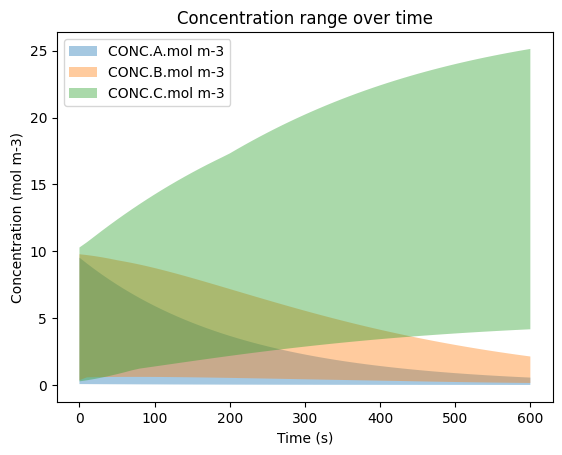
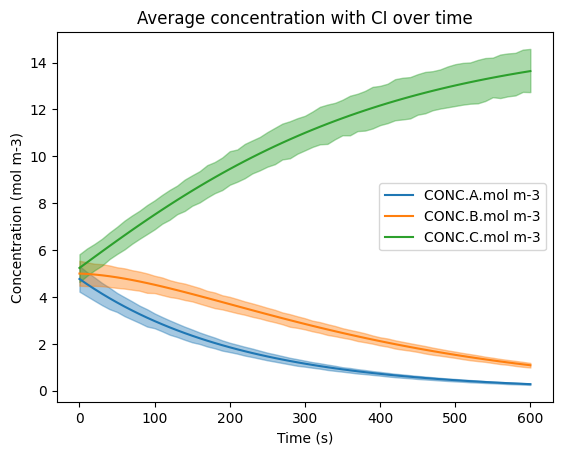
We’ll create two plots:
one containing the mean concentration for each species and their respective 95% confidence intervals
one for each species’ concentration range.
6a. Visualizing the Confidence Interval#
Here, the three species are plotted out with Seaborn’s lineplot() function, which takes in an input x and y variable, confidence interval ci (95% here) and alpha value (opacity of shaded regions).
The DataFrame has more than one value for each time step (x-axis), and the solid line represents the mean of the species’ concentrations at every time step.
[15]:
sns.lineplot(data=df, x='time.s', y='CONC.A.mol m-3', errorbar=('ci', 95), err_kws={'alpha' : 0.4}, label='CONC.A.mol m-3')
sns.lineplot(data=df, x='time.s', y='CONC.B.mol m-3', errorbar=('ci', 95), err_kws={'alpha' : 0.4}, label='CONC.B.mol m-3')
sns.lineplot(data=df, x='time.s', y='CONC.C.mol m-3', errorbar=('ci', 95), err_kws={'alpha' : 0.4}, label='CONC.C.mol m-3')
plt.title('Average concentration with CI over time')
plt.ylabel('Concentration (mol m-3)')
plt.xlabel('Time (s)')
plt.legend(loc='center right')
plt.show()
6b. Visualizing the Min-Max Curve#
This figure is similar to the CI curves above, but it instead displays the range of values for each species at each time step.
To build this figure, the min and max at every time step are found and populated into their respective arrays to represent the bottom curve and top curve for each species.
All of the curves are then plotted for each species with a lower alpha so that the overlaps are visible.
[16]:
min_y = []
max_y = []
for i in range(0, sim_length + 1, time_step):
    min_y.append({species: np.min(concentration) for species, concentration in concentrations_solved[int(i/time_step)].items()})
    max_y.append({species: np.max(concentration) for species, concentration in concentrations_solved[int(i/time_step)].items()})
time_x = list(map(float, range(0, sim_length + 1, time_step)))

plt.fill_between(time_x, [y['A'] for y in min_y], [y['A'] for y in max_y], alpha = 0.4, label='CONC.A.mol m-3')
plt.fill_between(time_x, [y['B'] for y in min_y], [y['B'] for y in max_y], alpha = 0.4, label='CONC.B.mol m-3')
plt.fill_between(time_x, [y['C'] for y in min_y], [y['C'] for y in max_y], alpha = 0.4, label='CONC.C.mol m-3')
plt.title('Concentration range over time')
plt.ylabel('Concentration (mol m-3)')
plt.xlabel('Time (s)')
plt.legend()
plt.show()